Buffer vs Mixpost (2026): pricing, features, which to pick
Buffer from ~$5/mo per channel (free plan), Mixpost Lite free (self-hosted); Pro $299 one-time, checked by hand in 2026. Where each one wins, what a team of five really pays, and the cases where neither is the right buy.
| Tool | Best for | Starting price | What that price covers | Free plan |
|---|---|---|---|---|
| Buffer | creators and small teams wanting simple, affordable multi-network scheduling | from ~$5/mo per channel (free plan) | not verified | Free trial |
| Mixpost | teams that want to own the server and pay once, and connect an agent through the API or MCP | Lite free (self-hosted); Pro $299 one-time | unlimited users and accounts; Lite is free for Facebook Pages, X and Mastodon | Free trial |
| ViralHunt | discovering viral content and turning it into posts, as a team | from $29/mo | 1 user (Creator). Studio: $99/mo for up to 4 users and 4 projects, no per-seat charge | Yes, and it never expires |
Every price was read off the vendor's own pricing page. We show no G2 or Capterra ratings because we are not listed there, and an invented rating would destroy the only thing these pages have, which is that all of it can be checked.
Choosing between Buffer and Mixpost? Below we break them down feature by feature, on pricing and on use case, and show where ViralHunt fits as the all-in-one alternative that tracks viral content across 12 networks.
| Feature | Buffer | Mixpost | ViralHunt |
|---|---|---|---|
| Social platforms covered | 11, Facebook, Instagram, TikTok, LinkedIn, X, YouTube, Threads, Pinterest, Google Business, Bluesky, Mastodon | 12 on Pro, Facebook, X, Mastodon, Instagram, LinkedIn, YouTube, TikTok, Pinterest, Threads, Bluesky, Pixelfed, Google Business | 12, TikTok, Instagram, Facebook, Pinterest, Reddit, X, Bluesky, Mastodon, Douyin, RSS, Quora, Tumblr |
| Real-time viral content discovery | ✗ | ✗ | ✓ |
| Per-post engagement tracking | ✓ | Partial | ✓ |
| Cross-platform trending radar | ✗ | ✗ | ✓ |
| Editorial board (Kanban workflow) | Partial | Partial | ✓ |
| AI content studio | ✓ | Partial | ✓ |
| Built-in team chat | ✗ | ✗ | ✓ |
| Browser-extension scrapers | Partial | ✗ | ✓ |
| Niche / keyword tracking | ✗ | ✗ | ✓ |
| Mention / sentiment listening | ✗ | ✗ | Partial |
| Post scheduling & publishing | ✓ | ✓ | ✓ |
| Auto-DM (comment → DM) | ✗ | ✗ | ✓ |
| Public API + AI-agent access | ✓ | ✓ | ✓ |
| Free trial | ✓ | ✓ | Free plan, no expiry |
| Starting price | from ~$5/mo per channel (free plan) | Lite free (self-hosted); Pro $299 one-time | from $29/mo |
📡 12 networks, one screen
TikTok, Instagram, Facebook, Pinterest, Reddit, X, Bluesky, Douyin, RSS, Quora & Tumblr, viral posts and engagement in a single radar.
🗂️ Built-in workflow
Assign any post to an editorial board, draft with the AI studio, and coordinate in team chat, no extra tools.
💸 Better value
One affordable plan instead of stacking a discovery tool + a workflow tool + a listening tool.
What is Buffer?
Buffer is a simple, popular social media scheduler for planning and publishing posts across up to 11 networks including Facebook, Instagram, TikTok, LinkedIn, X, YouTube, Threads, Pinterest and Bluesky. It offers a clean queue and calendar, an AI Assistant for drafting, own-account analytics, a reply inbox, a link-in-bio page and team approvals. Its permanent free plan (3 channels, 10 posts each) makes it a favourite for solo creators. It is built to publish your content, not to discover viral posts across networks.
- Very affordable, with a genuinely usable permanent free plan
- Broad publishing coverage, 11 networks including Threads and Bluesky
- Clean, beginner-friendly scheduling with an AI Assistant
- Per-channel pricing adds up for many accounts
- No viral/trend discovery, you source content yourself
- No social listening; deeper features gated to the Team plan
Pricing: from ~$5/mo per channel (free plan)
What is Mixpost?
Mixpost is a self-hosted social media scheduler sold as a licence, not a subscription. Lite is free and covers Facebook Pages, X and Mastodon with a calendar, media library and basic analytics. Pro is $299 one-time (a year of updates, perpetual licence, 14-day refund) and adds Instagram, LinkedIn, YouTube, TikTok, Pinterest, Threads, Bluesky, Pixelfed and Google Business, multi-tenant workspaces, an engagement inbox, an AI assistant, approval flow, a public API, an MCP server and webhooks; Enterprise is $1,199 one-time with white-label and billing for reselling it. Users and accounts are unlimited because the server is yours; a hosted Mixpost Cloud exists with a trial. It publishes what you or your agent hand it; it does not find what is going viral.
- One-time price with unlimited users and accounts
- API, MCP server and webhooks on Pro
- Open source: the data stays on your server
- Self-hosting is on you (server, updates, backups)
- Lite covers only Facebook Pages, X and Mastodon
- No discovery, no trends, no editorial review
Pricing: Lite free (self-hosted); Pro $299 one-time
When to buy one of these two
You came here comparing two tools, not looking for a third. So first, plainly, what each one is the better buy for:
- Buffer if your job is creators and small teams wanting simple, affordable multi-network scheduling. Very affordable, with a genuinely usable permanent free plan.
- Mixpost if your job is teams that want to own the server and pay once, and connect an agent through the api or mcp. One-time price with unlimited users and accounts.
If either of those sentences describes your job, you have your answer and the rest of this page is not for you. What follows is for the case where neither one does.
The third option: ViralHunt
ViralHunt is a viral-content discovery platform that tracks the top-performing posts across 12 networks, TikTok, Instagram, Facebook, Pinterest, Reddit, X, Bluesky, Mastodon, Douyin, RSS, Quora and Tumblr, in real time. Beyond discovery, it turns trends into a team workflow with an editorial Kanban board, an AI content studio and built-in team chat, and now schedules and auto-publishes finished posts to 11 social networks, with separate brand/client projects. So a whole team can find, create and publish content in one place instead of stacking a discovery tool, a workflow tool and a scheduler.
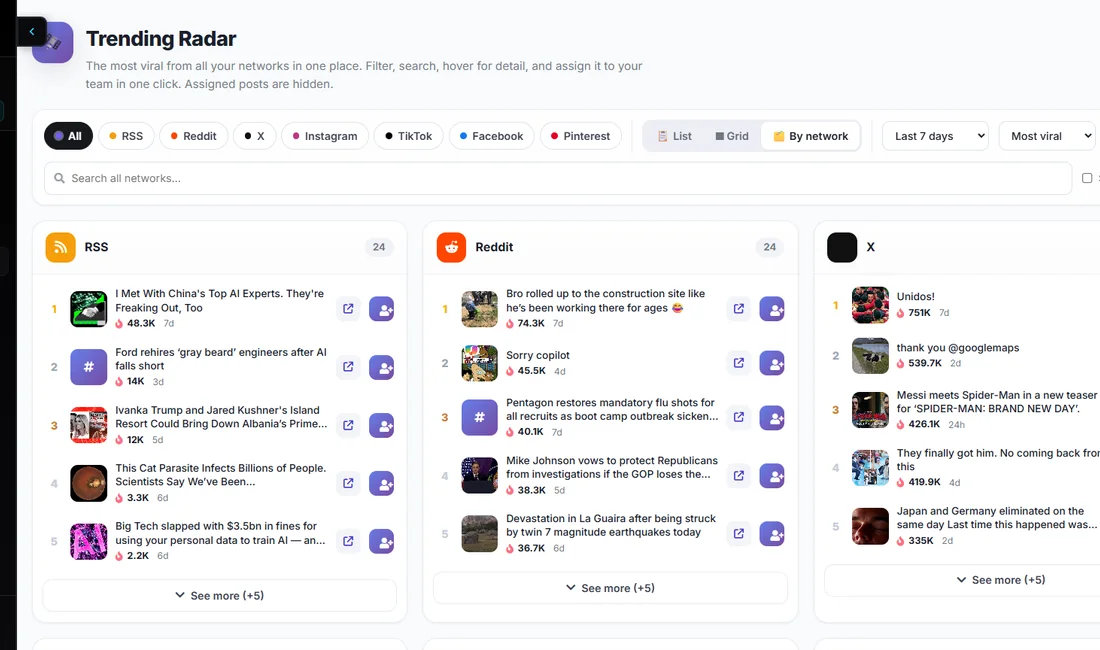
- Tracks viral posts across 12 networks in one dashboard
- Editorial board, AI studio and team chat built in, no extra tools
- Schedules & auto-publishes to 11 networks, with multi-brand projects
- Affordable, a free plan that never expires, plus a REST API for AI agents
- Not a dedicated enterprise listening/analytics suite
- Younger brand than the incumbents
Pricing: from $29/mo
Comparing Buffer and Mixpost because neither one quite does what you need? ViralHunt has a free plan that does not expire, so checking is free and there is no countdown.
Try for freeWhich should you choose?
- Buffer, best for creators and small teams wanting simple, affordable multi-network scheduling.
- Mixpost, best for teams that want to own the server and pay once, and connect an agent through the API or MCP.
- ViralHunt, best if you want to discover viral content across 12 networks and turn it into content as a team.