FeedHive vs Planoly (2026): Preise, Funktionen und welches Tool
FeedHive from ~$17/mo (listed as €15), Planoly from $14/mo (14-day trial), 2026 von Hand geprüft. Wo jedes gewinnt, was ein Fünferteam wirklich zahlt, und wann keines die richtige Wahl ist.
| Tool | Best for | Starting price | What that price covers | Free plan |
|---|---|---|---|---|
| FeedHive | creators and marketers who want AI-assisted scheduling and recycling | from ~$17/mo (listed as €15) | not verified | Free trial |
| Planoly | Creator und Solo-Marken, die ein Instagram- oder TikTok-Grid planen und über die Bio verkaufen | from $14/mo (14-day trial) | 1 social set, 1 user (Starter) | Free trial |
| ViralHunt | discovering viral content and turning it into posts, as a team | from $29/mo | 1 user (Creator). Studio: $99/mo for up to 4 users and 4 projects, no per-seat charge | Yes, and it never expires |
Every price was read off the vendor's own pricing page. We show no G2 or Capterra ratings because we are not listed there, and an invented rating would destroy the only thing these pages have, which is that all of it can be checked.
Sie schwanken zwischen FeedHive und Planoly? Unten vergleichen wir sie Funktion für Funktion, beim Preis und im Anwendungsfall, und zeigen, wo ViralHunt als All-in-one-Alternative passt, die virale Inhalte 12 Netzwerke verfolgt.
| Funktion | FeedHive | Planoly | ViralHunt |
|---|---|---|---|
| Abgedeckte soziale Netzwerke | 9, Facebook, Instagram, YouTube, X, TikTok, LinkedIn, Pinterest, Google Business, Threads | 8, Instagram, TikTok, LinkedIn, Facebook, YouTube, Threads, Pinterest, X | 12, TikTok, Instagram, Facebook, Pinterest, Reddit, X, Bluesky, Mastodon, Douyin, RSS, Quora, Tumblr |
| Echtzeit-Entdeckung viraler Inhalte | ✗ | ✗ | ✓ |
| Engagement-Tracking pro Beitrag | ✓ | Teilweise | ✓ |
| Plattformübergreifender Trend-Radar | ✗ | ✗ | ✓ |
| Redaktions-Board (Kanban-Workflow) | ✗ | Teilweise | ✓ |
| KI-Content-Studio | ✓ | Teilweise | ✓ |
| Integrierter Team-Chat | ✗ | ✗ | ✓ |
| Browser-Erweiterungen (Scraper) | ✗ | ✗ | ✓ |
| Nischen- / Keyword-Tracking | ✗ | ✗ | ✓ |
| Mentions- / Sentiment-Monitoring | ✗ | ✗ | Teilweise |
| Beitragsplanung & Veröffentlichung | ✓ | ✓ | ✓ |
| Auto-DM (Kommentar → DM) | ✗ | ✓ | ✓ |
| Öffentliche API + KI-Agent-Zugang | Teilweise | ✗ | ✓ |
| Kostenlose Testphase | ✓ | ✓ | Free plan, no expiry |
| Startpreis | from ~$17/mo (listed as €15) | from $14/mo (14-day trial) | ab 29 $/Monat |
📡 12 Netzwerke, ein Bildschirm
TikTok, Instagram, Facebook, Pinterest, Reddit, X, RSS, Quora und Tumblr, virale Beiträge und Engagement in einem Radar.
🗂️ Integrierter Workflow
Weisen Sie jeden Beitrag einem Redaktions-Board zu, texten Sie mit dem KI-Studio und stimmen Sie sich im Team-Chat ab, ohne Zusatztools.
💸 Besseres Preis-Leistungs-Verhältnis
Ein bezahlbares Abo statt ein Entdeckungstool + ein Workflow-Tool + ein Monitoring-Tool zu stapeln.
Was ist FeedHive?
FeedHive is an AI-first social media scheduler for publishing across networks like Facebook, Instagram, X, LinkedIn, TikTok, YouTube and Threads. Its emphasis is AI: a writing assistant, hashtag and image generation, and performance prediction that scores posts before they go out. Signature features include post recycling, conditional posting and automation workflows with webhooks, plus smart scheduling, a social inbox, analytics, workspaces and a REST API on higher tiers. It is a publishing/automation tool, it does not discover viral content across networks.
- Strong AI toolset incl. performance prediction before posting
- Post recycling and conditional-posting automation with webhooks
- Broad platform coverage with workspaces and a REST API
- No viral discovery, trending radar or listening
- Cheapest plan is limited; only a 7-day trial, no free tier
- Outbound-only, no niche/topic research to source content
Preise: from ~$17/mo (listed as €15)
Was ist Planoly?
Planoly is a visual-first scheduler for creators: a drag-and-drop grid and calendar, a media library, AI content ideas, comment-to-DM automation and a link-in-bio storefront for selling digital products, publishing to Instagram, TikTok, LinkedIn, Facebook, YouTube, Threads, Pinterest and X. Starter is $14 a month for 1 social set and 1 user; Growth $24 for 2 sets and 2 users; Pro $47 for 6 sets and 6 users, with extra sets and users as add-ons; every paid plan has a 14-day trial and the mobile app has a free tier of 10 uploads a month. It plans and sells your own content; it does not discover what is going viral across networks.
- Grid preview and visual calendar built for creators
- Auto-DM and a link-in-bio storefront included
- From $14 a month, 6 users on Pro
- No viral or trending discovery across networks
- Basic analytics; no social inbox or listening
- Priced per social set: more profiles are add-ons
Preise: from $14/mo (14-day trial)
When to buy one of these two
You came here comparing two tools, not looking for a third. So first, plainly, what each one is the better buy for:
- FeedHive if your job is creators and marketers who want ai-assisted scheduling and recycling. Strong AI toolset incl. performance prediction before posting.
- Planoly if your job is creator und solo-marken, die ein instagram- oder tiktok-grid planen und über die bio verkaufen. Grid preview and visual calendar built for creators.
If either of those sentences describes your job, you have your answer and the rest of this page is not for you. What follows is for the case where neither one does.
Die dritte Option: ViralHunt
ViralHunt ist eine Plattform zur Entdeckung viraler Inhalte, die die leistungsstärksten Beiträge 12 Netzwerke, TikTok, Instagram, Facebook, Pinterest, Reddit, X, RSS, Quora und Tumblr, in Echtzeit verfolgt. Über die Entdeckung hinaus verwandelt sie Trends in einen Team-Workflow mit Redaktions-Kanban-Board, KI-Content-Studio und integriertem Chat, damit ein ganzes Team Inhalte an einem Ort findet, zuweist und erstellt.
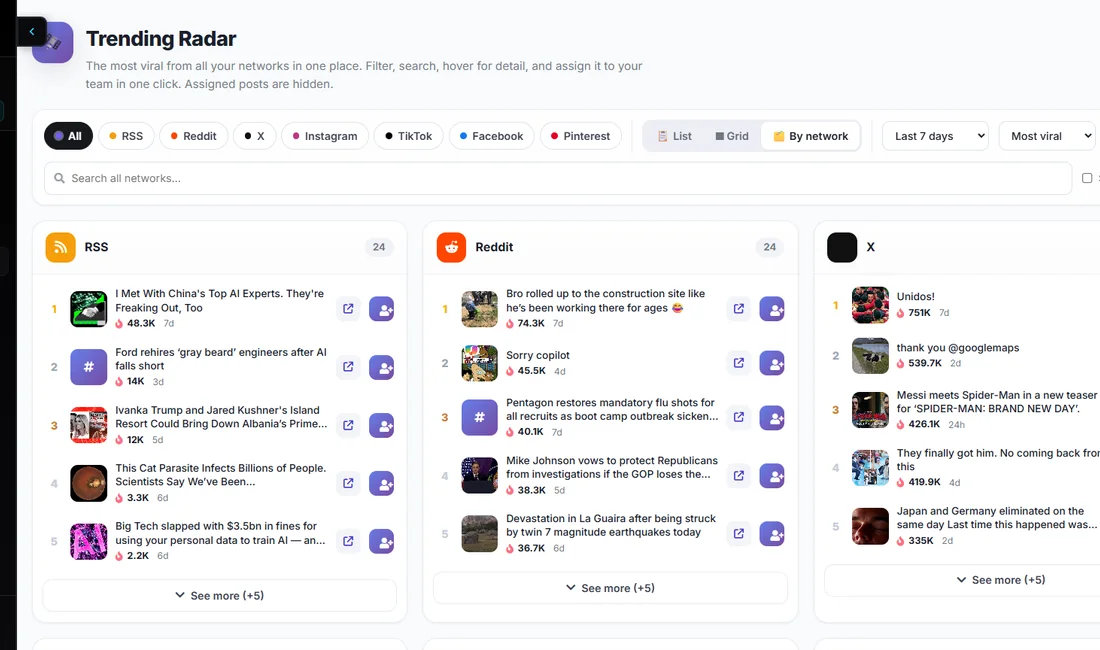
- Verfolgt virale Beiträge 12 Netzwerke in einem Dashboard
- Redaktions-Board, KI-Studio und Team-Chat integriert, ohne Zusatztools
- Plattformübergreifender Trend-Radar + Nischen-/Keyword-Filter
- Bezahlbar, mit kostenloser Testphase
- Keine Enterprise-Listening-/Analyse-Suite
- Jüngere Marke als die etablierten Anbieter
Preise: ab 29 $/Monat
Sie vergleichen FeedHive und Planoly, weil keines davon wirklich das tut, was Sie brauchen? ViralHunt hat einen kostenlosen Plan ohne Ablaufdatum: Prüfen kostet nichts und es läuft kein Countdown.
Kostenlos testenWelches sollten Sie wählen?
- FeedHive, ideal für creators and marketers who want AI-assisted scheduling and recycling.
- Planoly, ideal für Creator und Solo-Marken, die ein Instagram- oder TikTok-Grid planen und über die Bio verkaufen.
- ViralHunt, ideal, wenn Sie virale Inhalte 12 Netzwerke entdecken und im Team in Content verwandeln wollen.
Häufige Fragen
Was ist besser: FeedHive oder Planoly?
Was ist die beste Alternative zu FeedHive?
Was kosten FeedHive und Planoly?
Sehen Sie, was gerade in Ihrer Nische viral geht
Testen Sie ViralHunt heute kostenlos.
Kostenlos testenIhr betreut Kundenmarken? Entdeckt ViralHunt für Agenturen →