Instagram profiles are read as a grid, which is why visual planning is a genuine workflow rather than a nicer calendar. The tools below differ mostly in how seriously they take that, and in what the entry plan actually allows once you look past the headline price.
Tool
Best for
Starting price
What that price covers
Free plan
Later
Instagram-first creators, brands and agencies who want visual planning and link-in-bio
from ~$25/mo (14-day trial)
1 user, 1 social set of 8 profiles, 30 posts per profile ($18.75 billed annually)
Free trial
Metricool
agencies and social media managers who want analytics, scheduling and ads reporting in one place
free plan; from ~$20/mo
unlimited publishing; the free plan has 1 brand and 20 posts a month
Free trial
Buffer
creators and small teams wanting simple, affordable multi-network scheduling
from ~$5/mo per channel (free plan)
1 user per channel; the free plan has 3 channels and 10 posts per channel
Free trial
SocialPilot
agencies and small teams needing affordable multi-account scheduling and client reports
from ~$20/mo ($17 annual)
1 user, 5 social accounts
Free trial
ViralHunt
discovering viral content and turning it into posts, as a team
from $29/mo
1 user (Creator). Studio: $99/mo for up to 4 users and 4 projects, no per-seat charge
Yes, and it never expires
Every price was read off the vendor's own pricing page. We show no G2 or Capterra ratings because we are not listed there, and an invented rating would destroy the only thing these pages have, which is that all of it can be checked.
Later
from ~$25/mo (14-day trial)
Visual scheduling & link-in-bio
Later is a social media management platform built around visual planning: its Visual Planner lets you drag-and-drop and preview an Instagram grid before publishing, alongside a calendar, media library and auto-publishing for images, video, carousels, Stories and Reels across 8 networks (Instagram, Facebook, TikTok, Threads, Pinterest, LinkedIn, YouTube, Snapchat, it dropped X in 2025). Its well-known Link in Bio tool turns a bio into a clickable landing page, and it adds Best Time to Post, an AI caption writer (metered by credits) and analytics for your own accounts; higher tiers add approvals and a social inbox, and its Mavrck-based "Later Influence" arm handles influencer campaigns. It is built to plan and publish your content, not to discover what is going viral across networks.
Avantages
Best-in-class visual/grid planning and content calendar for Instagram
Mature, popular Link in Bio monetization tool
Broad publishing (8 networks) plus optional influencer marketing under one brand
Inconvénients
No cross-network viral discovery or trending radar, analytics cover your own accounts
Tight plan limits (e.g. 30 posts/profile and 1 user on Starter); AI metered by credits
Dropped X (2025); no permanent free plan and no built-in content workflow
A team of five:
$48.75/mo (Growth (2 users) plus 3 extra users at $3.75/mo each).
Read off their own pricing page on 2026-09-03.
Metricool is an all-in-one social media management and analytics platform: plan and publish content, measure performance, and manage paid campaigns across 11 networks (Instagram, TikTok, YouTube, Facebook, LinkedIn, X, Pinterest, Threads, Bluesky, Twitch, Google Business) from one workspace. Its standout strengths are unified analytics with automated PDF/Looker Studio reports, a drag-and-drop calendar with best-time scheduling, and integrated ads management for Meta, Google and TikTok, rare at its price. It also has competitor benchmarking (tracking the account metrics of rivals you specify), a social inbox, SmartLinks (link-in-bio) and an AI caption assistant; paid tiers add multi-brand, team roles and client approval. It measures and publishes your (and named competitors') output, it is not a cross-network viral-discovery engine.
Avantages
Broad, well-regarded native analytics and automated reporting across 11 networks
No content discovery, trending radar or repurposing, it measures output, not the viral landscape
LinkedIn and X are paid per-connection add-ons, so real cost climbs
No content-production board, team chat or DM automation
A team of five:
$53/mo (Advanced, 15 brands) (priced by brands, not users; team roles and post approval start on Advanced).
Read off their own pricing page on 2026-10-10.
Buffer is a simple, popular social media scheduler for planning and publishing posts across up to 11 networks including Facebook, Instagram, TikTok, LinkedIn, X, YouTube, Threads, Pinterest and Bluesky. It offers a clean queue and calendar, an AI Assistant for drafting, own-account analytics, a reply inbox, a link-in-bio page and team approvals. Its permanent free plan (3 channels, 10 posts each) makes it a favourite for solo creators. It is built to publish your content, not to discover viral posts across networks.
Avantages
Very affordable, with a genuinely usable permanent free plan
Broad publishing coverage, 11 networks including Threads and Bluesky
Clean, beginner-friendly scheduling with an AI Assistant
Inconvénients
Per-channel pricing adds up for many accounts
No viral/trend discovery, you source content yourself
No social listening; deeper features gated to the Team plan
A team of five:
$50/mo (Team, 5 channels) (Team is $10 per channel with unlimited users: five channels are $50, people are free).
Read off their own pricing page on 2026-10-10.
SocialPilot is a social media management and scheduling platform aimed at agencies and small teams. It centralises publishing across ten networks with a content calendar, bulk CSV scheduling (up to 500 posts) and optimal-time posting, plus a unified inbox for comments and messages, analytics with white-label client reports, approval workflows, an AI content assistant and a content library. It is built to schedule and report on the accounts you own, not to discover what is going viral across networks.
Avantages
Low price with generous account and user limits vs rivals
Bulk scheduling across 10 networks with a content calendar
ViralHunt tracks Instagram at post level, so we show what is pulling engagement there right now, but we have no grid preview and no link-in-bio product. For visual planning specifically, Later is the stronger tool and we would rather say so.
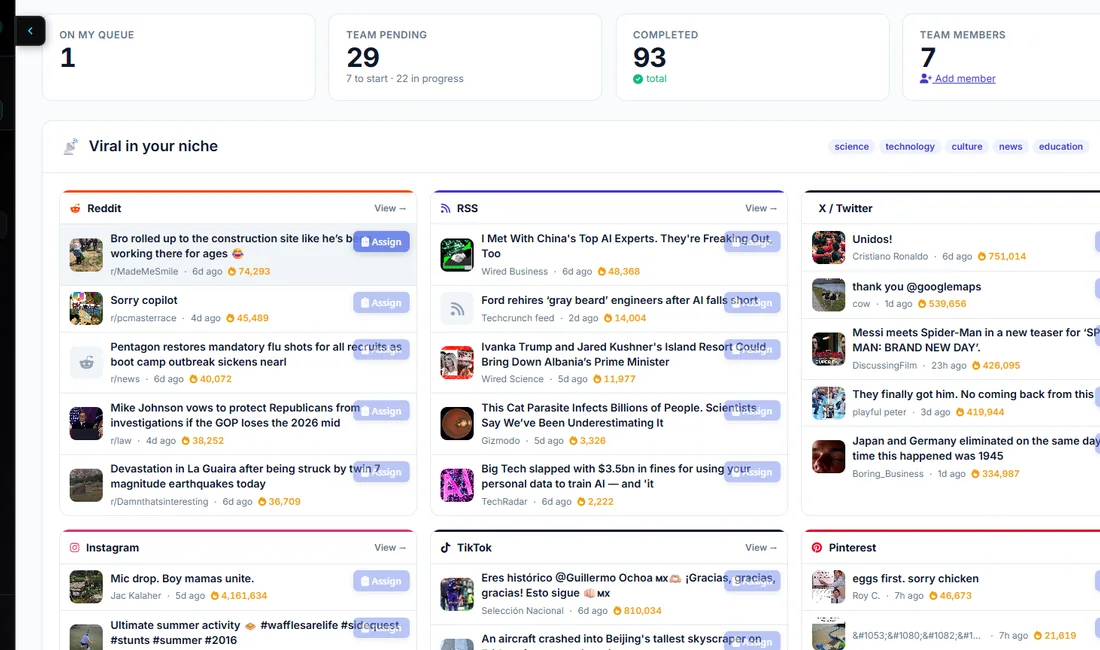
The dashboard, one section per network. This is the screen the tools above do not have, because none of them watches other people's posts.
Every price above was read off the vendor's own page and dated. ViralHunt has a free plan that does not expire, so you can check ours the same way.
Most comparison pages are written from marketing copy. This one is not.
each of these tools's pricing was read off their own pricing page, not from a third-party roundup.
Every capability we call partial says partial. We do not turn an almost into a tick.
Where each of these tools does something we do not, the table says so.
What we did not check, and why
We have not run each of these tools daily for weeks. We verify pricing, seat terms and documented capability; we do not publish an opinion on their interface that we have not earned.
Enterprise tiers behind a custom quote are out of scope, because there is no public figure to verify.
And one that cost us: for months this table said Ahrefs starts at $129/mo. It starts at $29, and they also run a free tier. We were overstating a competitor's price by 4.4x, in the direction that flattered us. We found it while verifying and corrected it. If you spot another one, it is a mistake rather than a tactic.
Frequently asked questions
How were these tools chosen?
They are the tools we are most often compared against in this category. Every figure comes from the vendor's own pricing page, read on the date shown on each comparison page, not from a third-party roundup.
Is this list ranked?
No. Ranking tools that answer different questions produces a number rather than an answer. Each entry says what it is the better buy for, and the section at the end says which to pick for which situation.
Where does ViralHunt sit?
ViralHunt tracks Instagram at post level, so we show what is pulling engagement there right now, but we have no grid preview and no link-in-bio product. For visual planning specifically, Later is the stronger tool and we would rather say so.
See what is viral in your niche right now
2.7 million posts measured across 12 networks. Free plan, no card, and it does not expire.